Dashboards & Compliance Reports

See the Full Picture with Interactive Security Analytics, Reports. Reports and Dashboards are fundamental components of any SIEM or enterprise log management system. Graylog offers an intuitive and customizable platform with a full range of visualizations, filters, and drill-downs, ensuring you have the exact data you need at your fingertips.

Graylog Dashboards and Compliance Reports Highlights:

From Raw Logs to IT Intelligence

Detect trends, uncover anomalies, and make smarter decisions.

Reduce Risk, Respond Faster

Spot threats instantly and cut investigation time with real-time security analytics.

Prove Compliance Without the Panic

Always be audit-ready with automated reports and pre-built dashboards—no scrambling required

Graylog Dashboards and Compliance Reports — A Closer Look

Graylog’s powerful framework lets you build, customize, and share dashboards that fit your exact needs. Whether using prebuilt templates or creating from scratch, you can drag, drop, and configure data visualization widgets to highlight the most relevant insights. From threat detection to compliance tracking, design analytics views that enhance decision-making—then effortlessly share them with your team for seamless collaboration.

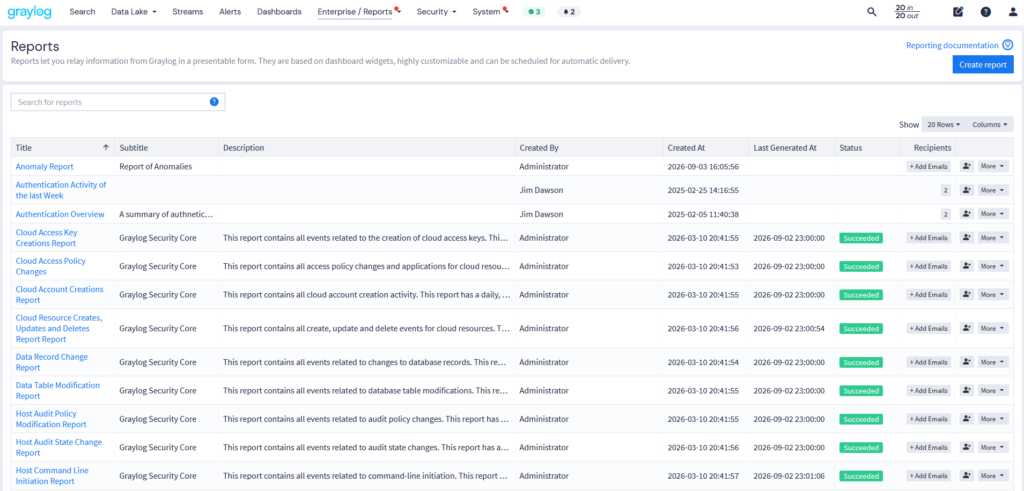
Automated Reports

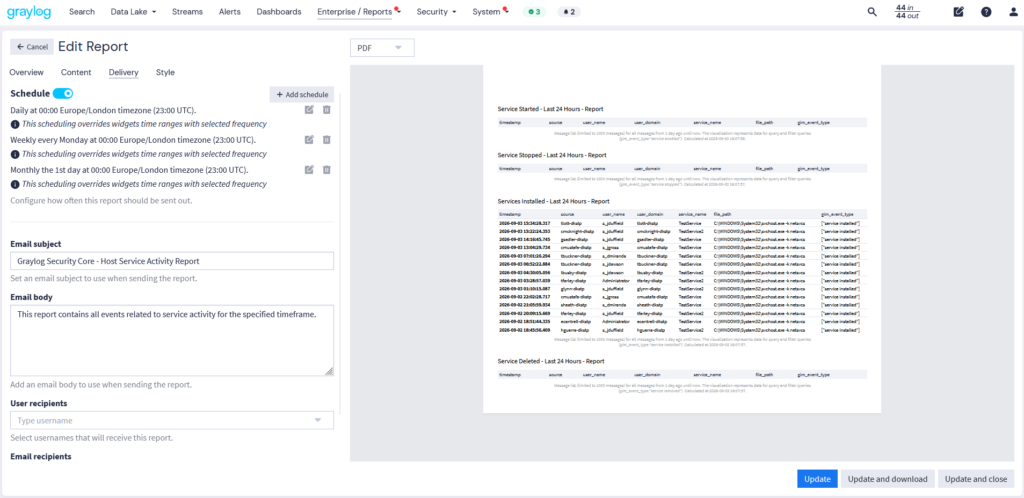
Take control of your insights with Graylog reporting. Run reports instantly when you need answers, or automate delivery to keep stakeholders informed, without lifting a finger. Get deeper understanding with built in Illuminate Security Core reports for more visibility

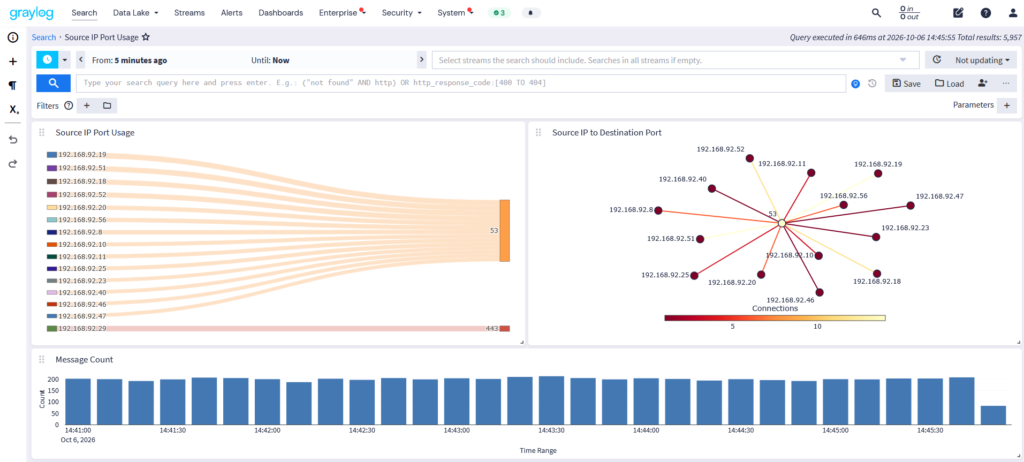
Graylog dashboards transform raw log data into actionable intelligence. Visualize trends with time series, analyze events in tables, and break down metrics with charts, heat maps, and geolocation views. With dynamic filtering and AI-powered explanations, you can quickly understand and act on security data.

Reports-Security Core

Automated Reports Available in:  Graylog Security  |  Graylog Enterprise  —   Compare Plans

*Feature capabilities vary by plan.

With Graylog, you have full control over your reports, ensuring they meet the needs of both security analysts and executive leadership. For the boardroom, enhance reports with custom logos, branded styling, executive summaries, and a structured table of contents for a professional, easy-to-navigate format. 

For security teams, generate detailed, data-rich reports that highlight threat trends, log analysis and compliance tracking—combining out-of-box Graylog curated reports with customizable views for deeper insight. These reports deliver the clarity needed for proactive defense and forensic investigations, while giving teams the flexibility for both high-level decision-making and in-depth security analysis.


Report Customization Available in:  Graylog Security  |  Graylog Enterprise  —  Compare Plans

*Feature capabilities vary by plan.

Graylog’s flexible framework supports both prebuilt and custom dashboards, letting you drag and drop visualization widgets to surface the data that matters most. Tailored views, enhanced with AI-driven explanations in your widgets and aggregations provide clear, explainable insights that accelerate confident decision-making.

Graylog dashboards transform raw log data into actionable intelligence. Visualize trends with time series, analyze events in tables, and break down metrics with charts, heat maps, and geolocation views. With dynamic filtering and AI-powered explanations, you can quickly understand and act on security data.

Dashboard Data Visualizations Available in:  Graylog Security  |  Graylog Enterprise  |  Graylog Open   —  Compare Plans

*Feature capabilities vary by plan.

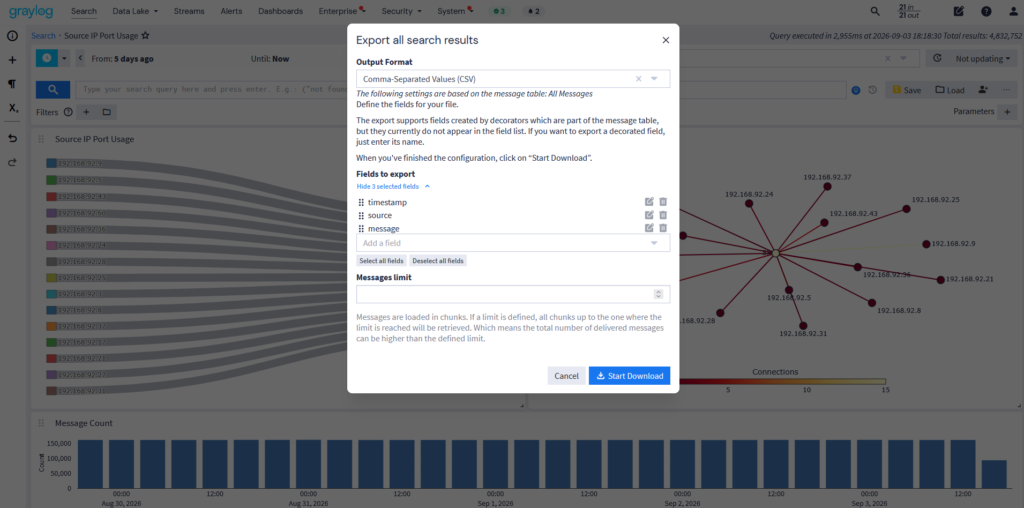
When every second counts, quick access to critical data can make all the difference. Graylog’s data export features let you extract key insights from dashboard widgets and turn them into actionable intelligence—whether for immediate response, compliance audits, or long-term analysis.

With seamless integration into existing dashboard widgets, exports are always up to date and ready when you need them. Generate and download data on-demand with exports in PDF, CSV, GELF, JSON, YAML, XML, NDJSON, or XLSX Text. Whether you’re accelerating an investigation, meeting compliance requirements, or tracking security trends, Graylog ensures you have the right data at the right time.


Dashboard Data Export  Available in:  Graylog Security  |  Graylog Enterprise  |  Graylog Open  —  Compare Plans

*Feature capabilities vary by plan.

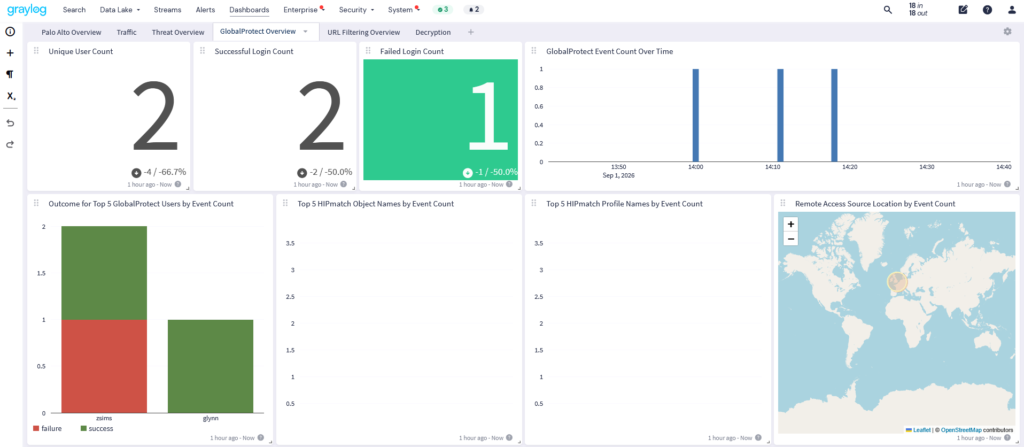
Graylog Illuminate delivers pre-built dashboards with parsed content designed to answer critical cybersecurity and log management questions instantly. These dashboards provide immediate visibility into security threats, compliance risks, and potential anomalies, so you can quickly detect and respond to threats.

With built-in security analytics, parameterized-enabled dashboards, and advanced filtering, you can drill down into specific datasets, refine queries on the fly, and uncover hidden threats with precision. Whether you’re tracking compliance, investigating suspicious activity, or hunting for indicators of compromise, Illuminate helps you turn raw data into actionable security intelligence—fast.

Illuminate Dashboards Available in:  Graylog SecurityGraylog Enterprise  —  Compare Plans

*Feature capabilities vary by plan.

Why Choose Graylog Dashboards & Compliance Reports

Powerful & Automated Reporting

  • Real-Time & Scheduled Reports – Generate reports instantly or automate delivery to keep stakeholders informed without manual effort.
  • Flexible Formats – Export data in PDF, CSV, XLSX, YML, JSON, and XML to fit compliance, security audits, and in-depth investigations.

Customizable Dashboards & Data Exports

  • Tailored Visualizations – Use graphs, heat maps, tables, and charts to transform raw logs into clear, actionable insights.
  • Seamless Data Export – Extract insights from dashboards on-demand in multiple formats for reporting, compliance, or security analysis.

Prebuilt Illuminate Dashboards for Security Analytics

  • Instant Threat Detection – Prebuilt dashboards provide immediate visibility into security risks, compliance gaps, and anomalies.
  • Advanced Filtering & Queries – Parameterized dashboards let you drill down into specific datasets for faster investigations.

Learn More About Dashboards and Compliance Reporting in Graylog

Graylog Dashboards provide real-time security monitoring through interactive data visualizations. They help organizations track threats, compliance risks, and log activity using time-series graphs, heat maps, geolocation tracking, and customizable widgets. Users can drag and drop widgets to create dashboards tailored to SIEM, compliance tracking, and forensic investigations.

Graylog allows users to build and modify dashboards using prebuilt templates or custom visualizations. Security teams can:

  • Drag and drop widgets for specific data insights.
  • Apply advanced filtering to drill down into specific security events.
  • Export visualizations in PDF, CSV, JSON, or other formats for compliance reporting.
  • Use parameterized queries for dynamic data adjustments.

Graylog supports automated and real-time compliance reports for:

  • Regulatory audits (PCI-DSS, GDPR, HIPAA, etc.).
  • Security compliance tracking for enterprise IT.
  • Log analysis reports with structured data formats.
  • Custom executive summaries with branding and table of contents.
  • Threat investigation reports for cybersecurity teams.

With Graylog’s scheduled report automation, security teams can:

  • Generate compliance reports instantly or on a schedule.
  • Track security logs and system activity without manual effort.
  • Ensure audit readiness by maintaining accurate documentation.
  • Export reports in multiple formats for seamless compliance workflows.

Yes! Graylog supports flexible report exporting in:

  • PDF for executive and compliance reports.
  • CSV/XLSX for raw data analysis.
  • JSON/XML/YML for integration into external security tools.
  • Plain Text/NdJSON for forensic investigations.

Graylog’s RBAC system ensures that:

  • Only authorized personnel can access dashboards and reports.
  • Permissions can be customized based on user roles.
  • Audit logs track every action, ensuring security integrity.

Graylog Illuminate Dashboards are pre-configured security dashboards that:

  • Provide instant visibility into security threats and compliance gaps.
  • Use parameterized queries for rapid filtering and analysis.
  • Enhance threat hunting with geolocation, anomaly detection, and SIEM integration.

Graylog Dashboards support advanced data visualizations, including:

  • Time-series graphs for event tracking.
  • Pie and bar charts for security metrics.
  • Heat maps for anomaly detection.
  • Geolocation tracking for monitoring threats by region.
  • Single-value metrics to highlight critical KPIs.

Graylog integrates with SIEM, log management, and security monitoring tools via:

  • API-based data sharing for seamless automation.
  • Scheduled report exports for compliance documentation.
  • Custom log ingestion for enterprise security workflows.

Graylog Illuminate uses prebuilt dashboards with parsed security data to:

  • Detect threats and anomalies instantly.
  • Refine queries dynamically to drill into suspicious activity.
  • Enhance forensic investigations with historical log analysis.