

Picture a SOC analyst starting an investigation. A suspicious spike in authentication activity appears on their dashboard, and they need to understand what’s happening quickly. To do that, they move through a familiar sequence of tools. What begins as a single investigation quickly turns into a chain of context switches:
- Reviewing a dashboard
- Pivoting into the SIEM for raw logs
- Pivoting to Windows Event Viewer because not all logs were available in the SIEM
- Pivoting to the NGFW because not all logs were available in the SIEM
- Referencing external IP addresses and domains with a threat intelligence platform
- Researching indicators in a browser
- Returning to the SIEM to build and refine queries
- Sharing findings and collaborating with team members in Slack
- Documenting actions in a ticketing system
That’s nine steps to investigate one event. This isn’t accidental. Security tools have evolved to solve isolated problems, but together they have created fragmentation. Each additional interface, alert console, and workflow layer adds cognitive overhead. Analysts spend hours reconstructing context, hopping between tools, and manually consolidating findings.
And now AI is becoming a standard part of security operations. Its real value, however, depends on how it’s integrated into the analyst’s workflow. When AI operates as a separate capability, its output often has to be validated in logs, enriched with historical context elsewhere, and documented in another system. These handoffs can add friction, but when AI works as a partner inside the workflow, it supports human judgment in place and keeps investigations moving without breaking context.
Collapsing Friction, Not Layering it
Security teams don’t benefit from AI as another interface to manage. They do benefit when it works alongside analysts, embedding intelligence into existing workflows and supporting decision-making where it already happens.
This is the approach Graylog 7.0 takes.
Dashboard AI Summarization analyses trends and anomalies across charts and metrics, then surfaces that analysis as concise, plain-language statements directly on the dashboard. This helps analysts understand what’s changing and why it matters without switching views or manually interpreting multiple graphs.

For example, an analyst might see: “Authentication failures increased 40% in the past hour, concentrated in three IP address ranges targeting administrative accounts.”
This summary appears in the same dashboard the analyst is already using, providing immediate context instead of requiring a separate investigation step. Investigation procedures also surface directly within the alert interface, rather than living in external playbooks. And these procedures represent common investigative steps like:
- Checking outbound transfer volume to external IP addresses over the past six hours
- Verifying user permissions for accessed files
- Documenting the timeline and escalating if volume exceeds 10GB
Each step links to the exact query that performs the check. Junior analysts can follow an established investigative path, while senior analysts adjust it based on what they’re seeing. Over time, this creates a shared, evolving workflow that reflects how the team actually investigates incidents.
Natural language queries work in a similar way through Model Context Protocol (MCP) integration, which allows AI systems to interact with operational tools using structured context and permissions. An analyst can ask the question: “show me overseas IP addresses that accessed finance servers in the last day,” and receive results formatted for immediate action. The system interprets intent, enforces access controls, and delivers answers without requiring query syntax or tool switching.
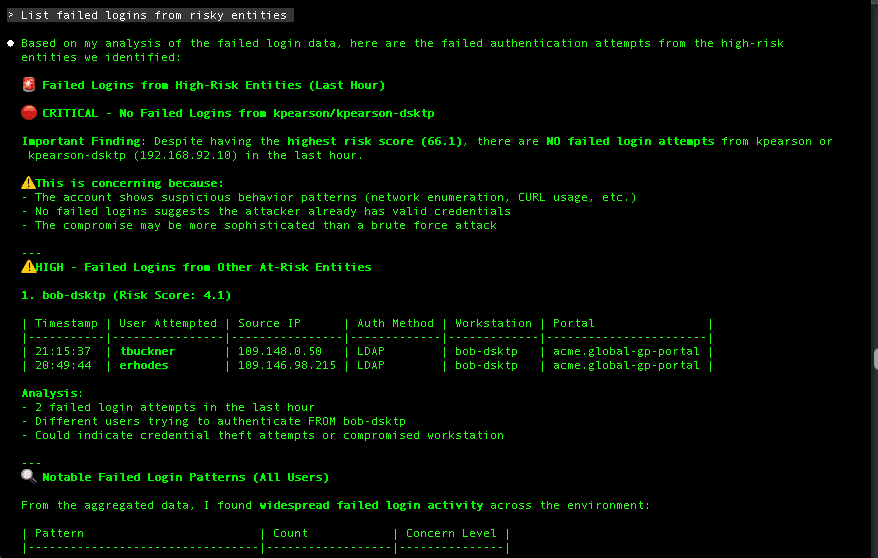
When Friction Drops
The real measure of practical AI is how many unnecessary steps it removes from everyday work. Many organizations are ready to unlock AI’s potential, yet productivity gains often fall short when AI is added as a separate layer instead of being embedded into existing workflows.
In security operations, that distinction matters. When intelligence is integrated into the workflow, junior analysts spend less time searching across systems for basic procedures and more time following clear investigation paths. Repetition builds pattern recognition, and edge cases are escalated with documented context instead of open questions. Senior analysts see fewer interruptions for routine guidance because Graylog 7.0 captures investigative knowledge and makes it available at the moment decisions are made.
Investigation timelines compress when analysts stay in flow. AI-generated timelines and incident reports maintain context automatically as investigations progress, reducing manual transcription and preserving decision continuity.
Human judgment remains central throughout. Analysts decide what matters, what to pursue, and when to escalate, while AI supports that judgment by structuring information and reducing administrative overhead. Security teams operate more effectively when intelligence is woven directly into their workflow as a partner.
Graylog 7.0 collapses common investigative steps into single views. Dashboard summaries surface insight without constant pivots to raw log interfaces. Investigation timelines reconstruct incidents without switching between query tools and documentation systems. AI-written reports provide remediation guidance directly within the workflow.
This is how AI strengthens security teams through partnership, supporting human expertise rather than replacing it, and improving focus instead of adding complexity.

VP of Product Management