

Security teams face a critical question: “What logs should we collect, and what detections should we enable to protect against threats targeting our industry?”
For a bank in the northeast, this isn’t academic. Threat groups like FIN7, Lazarus Group, and Carbanak specifically target financial institutions with sophisticated attacks ranging from SWIFT compromise to ransomware. But translating threat intelligence reports into actionable security configurations has traditionally been a manual, time-consuming process.
The Solution: Graylog + Model Context Protocol
The Model Context Protocol (MCP) bridges this gap by connecting AI assistants like Claude directly to Graylog . This enables real-time, context-aware recommendations based on your actual environment and current threat landscape.
What is MCP?
MCP is an open protocol developed by Anthropic that allows AI assistants to securely connect to external systems and services. Think of it as a universal adapter that lets Claude “see” and interact with your security tools in real-time.
Real-World Example
A security administrator asked a simple question:
“I am a bank in the north east, what data sources and Graylog Illuminate content should I enable to run detections based on threat adversaries that could target me?”
With this simple prompt, Anthropic was able to reason that it needed to understand the threat landscape and map this to current log sources and enabled threat detection content in their Graylog deployment. MCP tools developed by Graylog allow Claude to understand how to “talk” to Graylog, allowing for accurate analysis and not broad generalizations or guesswork.
Initial Step: Understand the threat landscape
It is challenging for lean security teams to perform all of their duties and stay current on the latest threat groups, their campaigns, and the specific tactics used in these campaigns. Based on the prompt, Claude performed research to recognize specific threat actors that target financial institutions.

Step 1: Mapping threat actor tactics to Graylog detection content
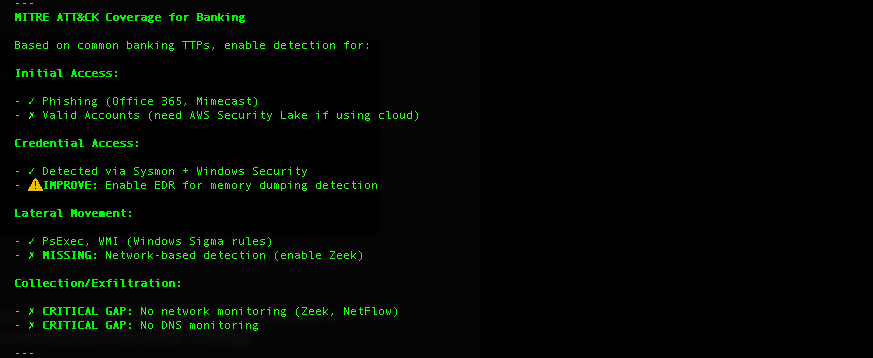
Claude, using MCP, recognized there are specific tools developed by Graylog for this analysis. Using get_mitre_threat_coverage and list_illuminate_content_packs, Claude can now compare and reason about threat actor tactics and enabled Graylog content.

Step 2: Add Key Log sources
Claude’s visibility into the data streams in Graylog and threat actor tactics allowed for the Large Language Model to reason on which additional data sources will enhance coverage most effectively.
The Action Plan
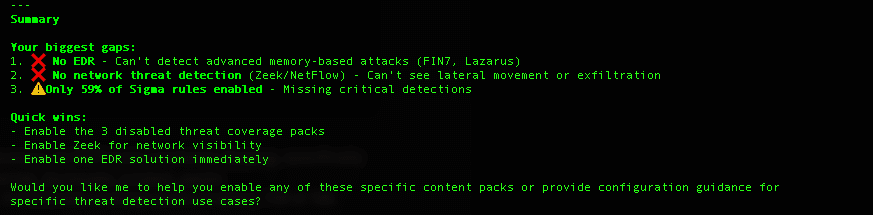
Equipped with the research on threat actors and their tactics and an assessment of Graylog’s enabled detection content and log sources, Claude developed a multi-week action plan prioritizing low hanging fruit (e.g. disabled content that aligns with current log sources and missing log sources critical to detecting idenfified threat actor tactics.
The Value Proposition
For Security Teams
Before MCP:
- Read threat intelligence reports manually
- Cross-reference MITRE ATT&CK framework
- Navigate Graylog UI to find relevant content packs
- Guess which logs matter for specific threats
- Time required: Hours to days
With MCP:
- Natural language question about threats
- Instant analysis of current configuration
- Gap analysis against threat actor TTPs
- Prioritized, actionable recommendations
- Time required: Seconds
Business Impact
- Faster threat response: Configure detections before attacks occur
- Optimized security spend: Focus log collection on high-value sources
- Reduced analyst burnout: AI handles research, humans make decisions
- Compliance alignment: Automatic mapping to regulatory requirements (GLBA, PCI-DSS, NYCRR 500)
MCP Tools Used
A nice feature of MCP is that it leverages tools without any required input from a user. The LLM discovers and invokes appropriate tools based on the prompt, with explicit permission by the user to leverage the tools. For this analysis, Claude leveraged these Graylog MCP tools:
| Tool | Purpose | Insight Gained |
| get_mitre_threat_coverage | Assess MITRE ATT&CK coverage | Only 59% of Sigma rules enabled |
| list_illuminate_content_packs | Inventory available detection content | 88 content packs available, many relevant ones disabled |
| list_new_security_events | Review active detections | Already detecting suspicious Office child processes, credential abuse |
| list_inputs | Analyze data ingestion | Good Windows/Office 365 coverage, missing EDR |
| list_streams | Understand data routing | 30+ streams configured, need Linux monitoring |
Setup: How to Enable This Capability
Requirements
- Graylog Security (v7.0+) with MCP enabled
- MCP-enabled client, e.g. Claude Code (Anthropic’s CLI) or Claude Desktop app
- API Token from your Graylog instance
Configuration Steps
- Install Claude Code:
npm install -g @anthropic-ai/claude-code
- Configure Graylog MCP Server:
Create ~/.config/claude-code/mcp_config.json: { "mcpServers": { "graylog": { "command": "npx", "args": ["-y", "@graylog/mcp-server-graylog"], "env": { "GRAYLOG_API_URL": "https://preview.graylog.cloud/api", "GRAYLOG_API_TOKEN": "your-api-token-here" } } } } - Start asking questions:
claude-code
I’m a healthcare provider, what detections should I enable for ransomware?
> Show me security events related to our highest-risk assets
> What Sigma rules detect credential dumping in my environment?
Advanced Use Cases
1. Threat-Informed Architecture Review
“Analyze my current log sources against APT41 tactics and recommend improvements”
2. Compliance Mapping
“Which Illuminate content packs help with PCI-DSS requirement 10 (logging and monitoring)?”
3. Incident Response Acceleration
“Show me all security events related to asset LAPTOP-ABC123 in the last 7 days”
4. Detection Engineering
“Create an investigation for these three security events and assign to the SOC team”
Real Results
In the banking example, Claude identified:
- 3 missing critical data sources (EDR, Zeek, DNS monitoring)
- 77 disabled Sigma rules that detect banking-specific threats
- Specific adversary TTPs (FIN7 Cobalt Strike, Lazarus SWIFT attacks)
- Prioritized action plan (Phase 1: Today, Phase 2: This Week, Phase 3: This Month)
The administrator went from “I don’t know what to enable” to a concrete implementation roadmap in under 60 seconds.
The Future of Security Operations
MCP represents a fundamental shift in how security teams interact with their tools. Instead of navigating complex UIs and documentation, you have a conversation with an AI that understands:
- Your current security posture
- Industry-specific threats
- Detection engineering best practices
- Compliance requirements
- Budget and resource constraints
This isn’t about replacing security analysts—it’s about amplifying their expertise and freeing them to focus on strategic decisions rather than tactical research.
Learn More:
- Graylog MCP Documentation: https://docs.graylog.org/
- Model Context Protocol: https://modelcontextprotocol.io/
- Claude Code: https://docs.claude.com/claude-code