
If you’re running WatchGuard Firebox appliances to protect your network, you already know how much is recorded in their logs: every allowed and denied connection, every user logon, every IPS and gateway antivirus detection, and every configuration change. Graylog provides a purpose-built way to make that signal immediately actionable. The WatchGuard Firebox Content Pack, available with an Illuminate license and Graylog Enterprise or Graylog Security, delivers ready-to-use parsing rules, streams, GIM categorization, a dashboard, and saved searches so you can turn raw Firebox syslog into structured, searchable security intelligence.
What is WatchGuard Firebox?
WatchGuard Firebox is a unified security platform that combines traditional traffic protection with defenses against intrusions, phishing attempts, malware, ransomware, and more. Fireboxes run the Fireware operating system and are available as both hardware and virtual appliances, bringing stateful firewalling, proxies, intrusion prevention, gateway antivirus, VPN, and user authentication together in one device.
Because the Firebox enforces policy at the boundary between your network zones and the internet, its logs capture who connected, what was allowed or denied, which threats were detected, and how the device itself was changed. Getting that data into Graylog in a normalized, correlated form is what turns a stream of raw Fireware syslog into usable detection and investigation data.
What This Pack Does
The WatchGuard Firebox Content Pack is purpose-built for Fireware 12.x and later. Once installed, it automatically parses Firebox event log messages into Graylog schema-compatible fields, enriches them, and maps them to the Graylog Information Model (GIM) using Fireware message IDs.
Included in the pack:
|
Requirements
|
Getting Logs into Graylog
Step 1 — Configure a Graylog Syslog Input
Create a local Syslog input on the Graylog server. The port you choose must match the port configured on the Firebox in the next step.
Step 2 — Configure Syslog in the Fireware Web UI
Configure the Firebox to send logs to Graylog:
- Select System > Logging.
- Click the Syslog Server
- Select Send log messages to these syslog servers.
- Click Add, then enter the Graylog server IP address.
- Configure the port to match the Graylog Syslog input.
- Select Syslog
- Select the timestamp and serial number boxes.
- Select a syslog facility (Local0 to Local7), and set Alarm to Local0 for high priority.
- Click Save.
Including the serial number in each message lets you tell individual Fireboxes apart when several devices send to the same input.
Step 3 — Install and Activate the Content Pack
In Graylog, navigate to Enterprise → Illuminate, locate the WatchGuard Firebox Processing Pack and Spotlight, and activate them. The stream and index set are created automatically. No additional rules are needed.
WatchGuard Firebox Log Message Processing
Every Fireware log message carries a msg_id that identifies the exact event type, and the pack uses these IDs to drive GIM categorization. Key elements extracted include:
- Device context: the Firebox name, serial number, and timestamp from the message header, plus the process that generated the event (such as firewall).
- Message ID: the Fireware msg_id, which maps each event to its GIM category and event type.
- Traffic details: the disposition (Allow or Deny), source and destination interfaces, protocol, source and destination IPs and ports, and TCP details.
- Geolocation: source and destination country from geo_src and geo_dst.
- Policy: the name of the Firebox policy that handled the traffic.
Here is an example of an allowed inbound connection:
DEV01 0011223344556 (2022-09-01T13:58:33) firewall: msg_id=”3000-0148″
Allow External Inside 44 tcp 20 238 10.11.12.13 192.168.1.10 58325 60951
offset 6 S 3172487743 win 4 geo_src=”USA” geo_dst=”USA”
(Inbound Policy-00)
Events Processed by This Pack
The content pack processes a broad range of Firebox event types, including:
- Authentication events: user authentication success and failure, logins, and logouts.
- Firewall traffic: allowed and denied connections, policy alarms, blocked sites and ports, and spoofing events.
- Proxy events: HTTP, HTTPS, and TCP-UDP proxy activity.
- Detection events: IPS, gateway antivirus (GAV), and APT detections in proxies, plus flood, scan, DDoS, and spoofing attack events.
- VPN events: VPN tunnel establishment.
- Audit and maintenance: device configuration changes, signature updates, and signature version checks.
- DHCP events: discover, offer, request, and acknowledgement messages.
- Operational events: address, server status, connection, interface, and host blocking events.
GIM Categorization
WatchGuard Firebox events are mapped to the Graylog Information Model, enabling consistent correlation with other data sources across your environment:
| Event | Event IDs | GIM Code | GIM Category | GIM Subcategory |
| User authentication succeeded/failed | 1100-0004, 1100-0005 | 100000 | authentication | authentication.logon |
| User login succeeded | 3E00-0002 | 100000 | authentication | authentication.logon |
| User logout | 3E00-0004 | 102500 | authentication | authentication.logoff |
| Firewall traffic (allow/deny) | 3000-0148, 3000-0149, 3000-0150, 3000-0173 | 120000 | network | network.network connection |
| Policy alarm, blocked site/port, spoofing | 3000-0167, 3000-0168, 3000-0169, 3000-0172 | 120000 | network | network.network connection |
| VPN tunnel established | 0207-0001 | 120000 | network | network.network connection |
| HTTP/HTTPS/TCP-UDP proxy events | 1AFF-*, 2CFF-*, 2DFF-* | 120000 | network | network.network connection |
| Operational events (address, server status, connections, interface, host blocking) | 3000-0029/002A/003C/0040/00CB/012D/0170/0171, 3001-1001/1002, 3100-0030 | 219999 | service | service.default |
| Device configuration change | 0101-0001 | 220500 | audit | audit.policy |
| Signature update | 2E02-0065, 2E02-0066, 2E02-0067 | 280100 | agent | agent.update |
| Signature version check | 2E02-0069 | 280200 | agent | agent.status |
| DHCP request | 1600-0003, DHCPREQUEST | 290000 | dhcp | dhcp.request |
| DHCP offer | 1600-0002, DHCPOFFER | 290100 | dhcp | dhcp.offer |
| DHCP discovery | 1600-0001, DHCPDISCOVER | 290200 | dhcp | dhcp.discovery |
| DHCP acknowledgement | DHCPACK | 290300 | dhcp | dhcp.acknowledgement |
| IPS/GAV/APT detection in proxy | 1AFF-0025/0026/0028/0029/0034, 2CFF-0005, 2DFF-0001 | 300000 | detection | detection.network_detection |
| Attack events (flood, scan, DDoS, spoofing) | 3000-0152 through 3000-0166 | 300000 | detection | detection.network_detection |
Why Log WatchGuard Firebox Events?
Collecting Firebox logs gives you more than a record of network traffic. It directly supports security detection, incident response, and compliance audit use cases at the network perimeter.
Security Monitoring
- Surface IPS, gateway antivirus, and APT detections as network detections in real time
- Detect flood, scan, DDoS, and spoofing attacks against your perimeter
- Monitor failed user authentication attempts for signs of password guessing
- Track configuration changes to catch unauthorized or accidental policy modifications
Threat Hunting
- Pivot from a detection’s source IP to every allowed connection from the same address
- Use source and destination geolocation to find traffic to or from unexpected countries
- Review proxy events for connections to suspicious destinations
- Correlate VPN tunnel activity and user logons with your identity provider’s authentication logs
Incident Response
- Reconstruct a host’s activity across traffic, proxy, and detection events on a single timeline
- Identify which Firebox policy allowed or denied traffic during an incident
- Use DHCP events to tie an IP address back to the device that held it at the time
- Scope an incident across multiple Fireboxes using the device name and serial number
Compliance & Audit
- Maintain a durable, searchable record of firewall enforcement, user access, and configuration changes
- Demonstrate that security signatures are kept current using update and version check events
- Support network security monitoring controls required by frameworks such as PCI DSS, HIPAA, ISO 27001, and SOC 2
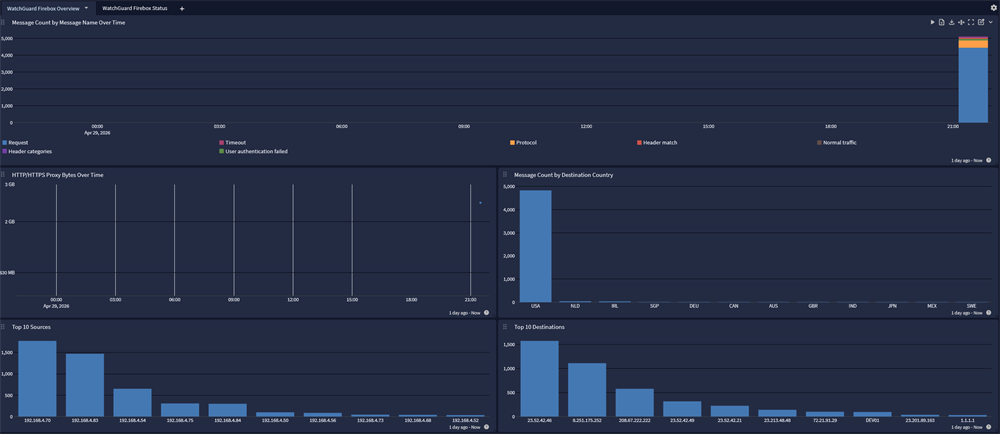
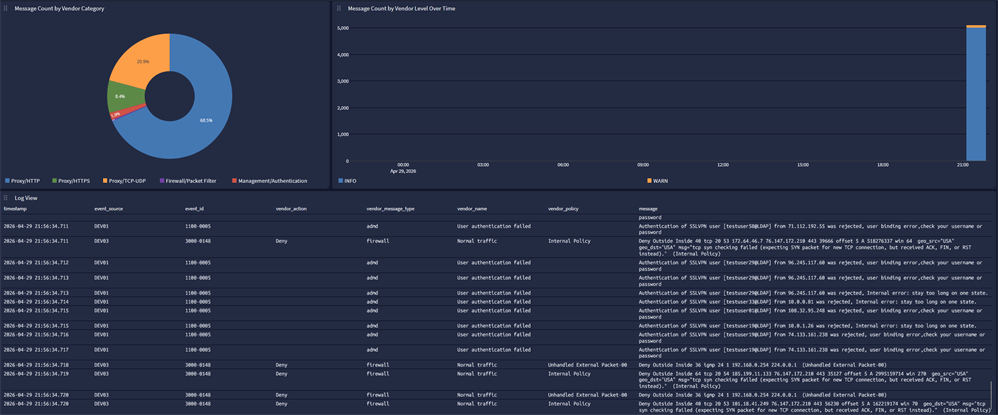
Graylog Enterprise and Security
With Graylog Enterprise and Security, your team gains structured visibility into the perimeter enforced by your WatchGuard Fireboxes. The WatchGuard Firebox Content Pack turns raw Fireware syslog into searchable, correlated, GIM-tagged data that flows directly into your threat detection, alerting, and investigation workflows. For more on this integration, please follow the documentation.