
Linux systems already record a lot about what happens under the hood. The problem is that much of that detail is hard to search, hard to correlate, and easy to ignore until something goes wrong.
AuditD closes that gap. It records who did what, when, and how on a Linux system, with syscall and file activity captured directly by the kernel. Collected and structured correctly, AuditD logs answer questions that traditional system logs can’t, especially during investigations, compliance audits, and post-incident reviews.
This post covers what AuditD is, what the Linux AuditD Processing Pack for Graylog Illuminate does with its events, how to get AuditD logs into Graylog, and why these events are worth collecting.
What Is AuditD?
AuditD is the user-space daemon of the Linux Audit framework. It writes audit records to disk, typically under /var/log/audit, and can pass them to other services such as syslog.
Those records come from two places. The kernel generates records for system calls and file access that match your AuditD rules. User-space components such as PAM and systemd also send events through the audit subsystem, covering logins, credential changes, account management, and service starts and stops.
With the right rules in place, AuditD can record:
- User logins, session starts and session ends
- Privilege escalation attempts
- Changes to users, groups, and credentials
- Execution of commands and binaries
- Modifications to sensitive system files
- Service starts and stops
- Changes to AuditD’s own configuration and logs (it can audit the auditor)
What AuditD captures depends on the rules you define. Kernel-level syscall and file monitoring only covers activity your rules are watching, so rule design matters as much as collection.
Raw AuditD logs are also hard to work with. They are verbose and dense, and one action can produce several related records (for example SYSCALL, PATH, and PROCTITLE) that share an event ID. Their content also varies between distributions and AuditD versions.
What the Linux AuditD Processing Pack Does
The Linux AuditD Processing Pack extracts, normalizes, and enriches AuditD events so they are searchable and investigation-ready in Graylog. It requires a Graylog Illuminate license with Graylog Enterprise or Graylog Security, running Graylog 6.1.3 or later.
The pack was built for Red Hat Enterprise Linux 9.5 and Ubuntu 24.04. Most recent versions with AuditD in their official repositories (RHEL 8+, Ubuntu 18+) should also work. AuditD must be a version that supports “enriched” logging.
Parsing and normalization. Raw audit records become structured fields with consistent names, so the same queries work across hosts. Analysts can filter on user and audit identity, source address or hostname, process name and executable path, event type and outcome, and session identifiers.
Correlation. Every event gets an event_correlation_hash field. Records that belong to the same AuditD event share it, so multi-part events can be grouped into one coherent timeline.
Outcome and identity. Every event gets a normalized event_outcome (success or failure) alongside the original vendor_event_outcome. Real, effective, and audit user IDs and names are mapped to distinct fields, so you can see who acted even after a su or sudo.
GIM categorization. Authentication, identity and access management, and service lifecycle events are mapped to the Graylog Information Model (GIM). That lets AuditD data sit alongside other security logs instead of in a silo. SYSCALL events are fully parsed and normalized but not GIM-categorized.
Dedicated stream and index set. On activation the pack creates the Illuminate:Linux AuditD Messages stream and the Linux AuditD Logs index set, if they don’t already exist. A new index set uses daily rotation and 90 days of retention, which you can adjust after installation. Audit data often needs different retention than general system logs, and keeping it separate stops it being buried in generic Linux noise.
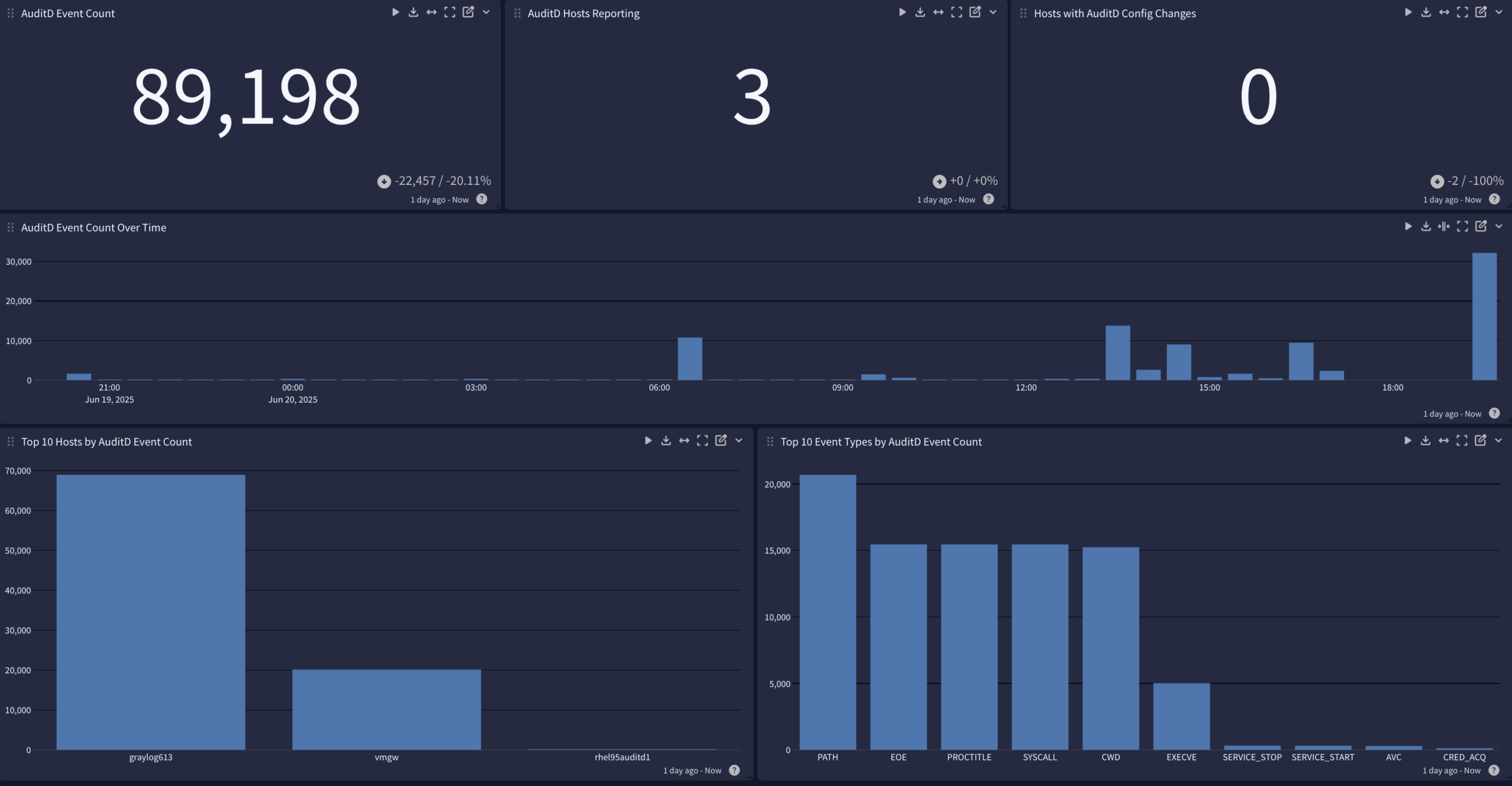
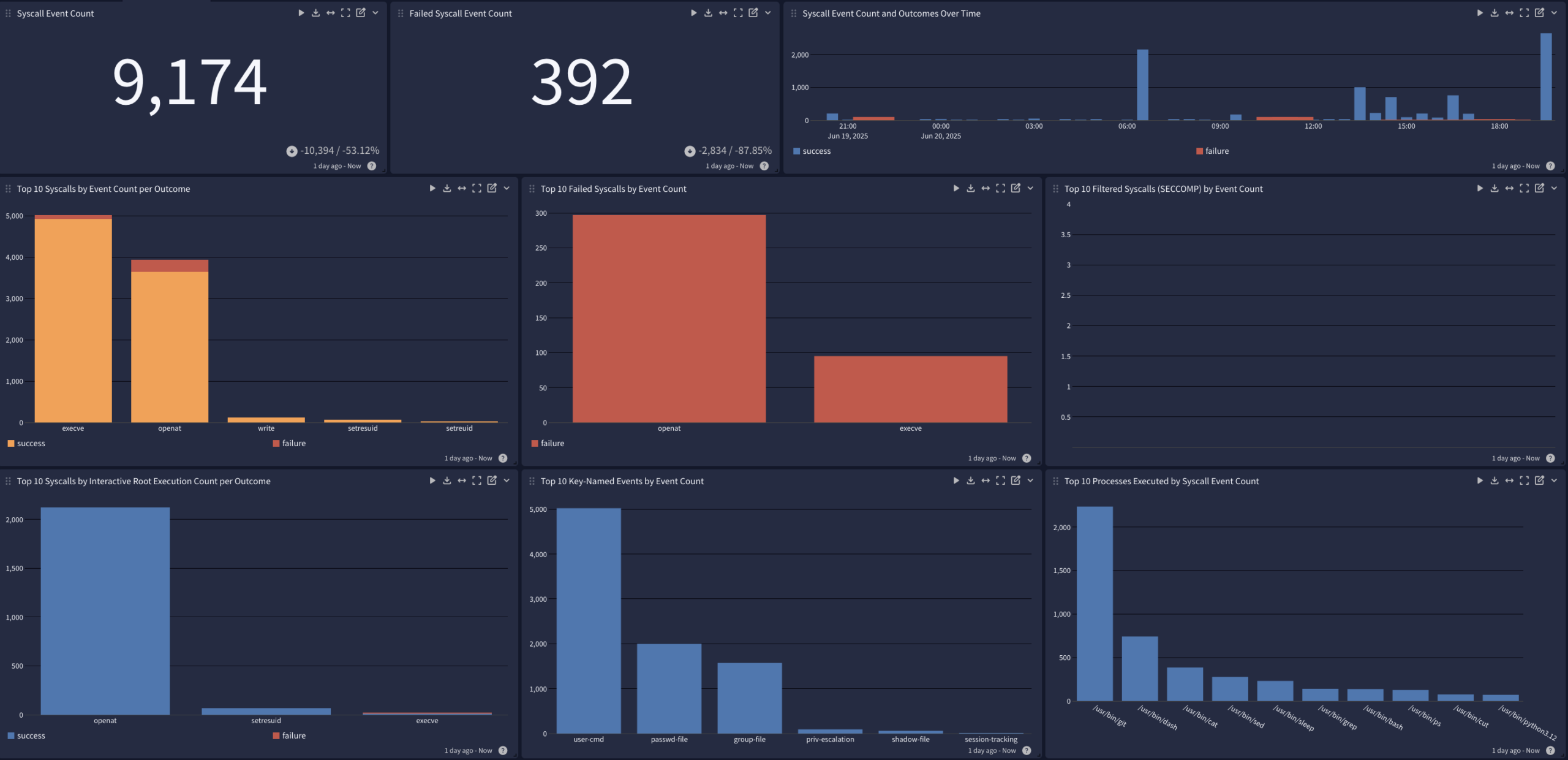
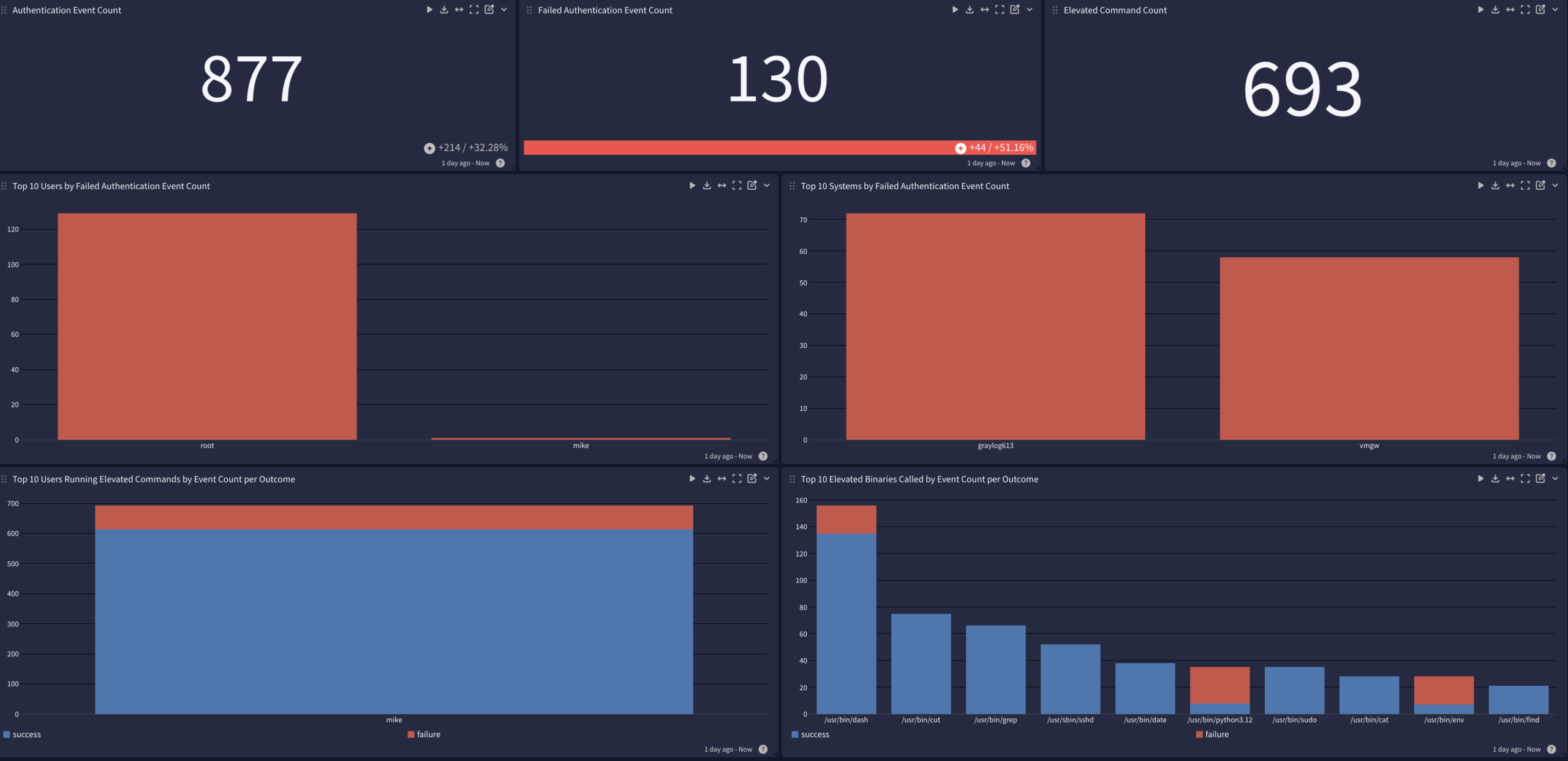
Dashboards. The Linux AuditD spotlight dashboards has four tabs: Overview, User Activity, Syscall Activity, and Identity and Access Management Activity.
Already using the Linux processing pack? AuditD events sent with your system logs were most likely landing in the Linux stream and index set. After you enable this pack, all AuditD messages route to the new AuditD stream and index set instead. Update any saved searches, dashboards, or alerts that expect them in the old location.
Getting AuditD Logs into Graylog
The pack expects AuditD events delivered through the host’s local Rsyslog service to a Graylog TCP syslog input. AuditD writes to syslog facility local6 at severity info; Rsyslog forwards those messages to Graylog and then drops them so they aren’t duplicated in the local system logs. The Illuminate documentation has the complete configuration for RHEL 9.5 and Ubuntu 24.04.
- Create a TCP syslog input in Graylog if you don’t already have one.
- Configure Rsyslog. Back up /etc/rsyslog.conf and /etc/rsyslog.d/, then create /etc/rsyslog.d/60-graylog.conf from the documented template, adding your Graylog server address and TCP syslog port. Validate it with sudo rsyslogd -N1, then restart Rsyslog.
- Allow the port on SELinux systems. On RHEL with a non-standard port, run sudo semanage port -a -t syslogd_port_t -p tcp <port>.
- Enable the AuditD syslog plugin. Install AuditD and its plugins (commonly audispd-plugins) if needed. In /etc/audit/plugins.d/syslog.conf, set active = yes and args = LOG_INFO LOG_LOCAL6, then restart AuditD.
- Load AuditD rules. Add rules to a file such as /etc/audit/rules.d/70-basic.rules and load them with sudo augenrules –load. The documentation includes a sample rule set covering user command execution, session tracking, privilege escalation, account file changes, and audit configuration and log tampering. (Sample rules in documentation)
Before you deploy: review your existing Rsyslog configuration so the new file doesn’t conflict with it. If another application already uses local6, pick an unused facility and change it in both the Rsyslog and AuditD configurations. If AuditD runs in immutable mode, new rules and plugin changes need a full reboot. The sample rules are a starting point, not a complete compliance rule set, and rules that reference syscalls your kernel lacks will fail to load.
AuditD Events Processed
The pack processes five families of AuditD events, each with its own field normalization. Different distributions and versions can generate different event types for the same action, so the exact events you see may vary by host.
| Event family | AuditD event types | Key normalized fields |
| Authentication and sessions | USER_AUTH, USER_ACCT, USER_START, USER_END, USER_LOGIN, USER_LOGOUT, LOGIN, CRED_ACQ, CRED_DISP, CRED_REFR | source_addr, source_hostname, destination_hostname, session_id, user and effective user names and IDs |
| Login policy violations | ANOM_LOGIN_FAILURES, ANOM_LOGIN_LOCATION, ANOM_LOGIN_SERVICE, ANOM_LOGIN_SESSIONS, ANOM_LOGIN_TIME | source_ip or source_addr, user_session_id, user_terminal, audit and effective user |
| User and group management | ADD_USER, DEL_USER, MOD_USER, ADD_GROUP, DEL_GROUP, MOD_GROUP, USER_MGMT, GRP_MGMT, ACCT_LOCK, ACCT_UNLOCK, USER_CHAUTHTOK, GRP_CHAUTHTOK, and related types | target_user_name, target_user_id, group_name, user_audit_name, user_effective_name |
| Service lifecycle | SERVICE_START, SERVICE_STOP, DAEMON_START, DAEMON_END, DAEMON_ABORT, DAEMON_CONFIG, DAEMON_ROTATE | service_name, process_id, real, audit and effective user |
| System calls | SYSCALL | process_path, process_name_alternate, process_id, process_parent_id, syscall_name, syscall_exit_code, user_terminal, real, audit, effective, saved and filesystem user and group |
All events also carry event_key (the key from the AuditD rule that fired), vendor_event_type, event_correlation_hash, and event_outcome. ANOM_LOGIN events are generated when a login access policy defined in Linux PAM is violated.
GIM Categorization
AuditD events map to three GIM categories: authentication, iam, and service. Most are categorized by AuditD event type; for the generic USER_MGMT and GRP_MGMT types, the op value decides the category. The table groups event types that share a mapping.
| AuditD event type(s) | GIM category | GIM subcategory | GIM event type |
| ANOM_LOGIN_* (FAILURES, LOCATION, SERVICE, SESSIONS, TIME) | authentication | authentication.access policy | access policy violation |
| USER_AUTH | authentication | authentication.credential validation | credential validation |
| USER_START | authentication | authentication.logon | logon |
| USER_END | authentication | authentication.logoff | logoff |
| USER_ACCT, USER_LOGIN, LOGIN, USER_LOGOUT, CRED_ACQ, CRED_DISP, CRED_REFR | authentication | authentication.default | authentication message |
| ADD_USER; ADD_GROUP; GRP_MGMT (add-group) | iam | iam.object create | account created / group created |
| DEL_USER; DEL_GROUP; GRP_MGMT (delete-group) | iam | iam.object delete | account deleted / group deleted |
| MOD_USER; MOD_GROUP; USER_MGMT (add-user-to-group) | iam | iam.object modify | account modified / group properties modified / group member added |
| USER_CHAUTHTOK, GRP_CHAUTHTOK | iam | iam.object modify | administrative password reset |
| ACCT_LOCK | iam | iam.object disable | account locked |
| ACCT_UNLOCK; USER_MGMT (faillock-reset) | iam | iam.object enable | account unlocked |
| ADD_USER_TO_GROUP, DEL_USER_FROM_GROUP, GRP_AUTH, USER_ROLE_CHANGE, other USER_MGMT and GRP_MGMT ops | iam | iam.default | iam message |
| SERVICE_START, DAEMON_START | service | service.start | service started |
| SERVICE_STOP, DAEMON_END | service | service.stop | service stopped |
| DAEMON_ABORT | service | service.state | service error |
| DAEMON_CONFIG | service | service.configuration | service configuration change |
| DAEMON_ROTATE | service | service.default | service event |
SYSCALL events are not GIM-categorized; use event_key and the normalized process and user fields to search them. The full per-event mapping is in the Illuminate documentation.
Why Log AuditD Events?
AuditD is often introduced for compliance, but its real value shows up during investigations. Once processed and enriched, AuditD events give you direct observations of system behaviour, recorded as it happens.
Security Monitoring
- Detect privilege escalation attempts as user sessions transition to root
- Surface login policy violations and repeated authentication failures that may indicate password guessing
- Catch unexpected account creation, password resets, and group membership changes
- Alert on changes to AuditD configuration, rules, or log files that could indicate an attempt to blind your monitoring
Threat Hunting
- Search every command an interactive user ran, using the executable path and rule key
- Follow the audit user ID to see who really performed an action after switching accounts with su or sudo
- Find binaries executing from unusual paths or under unexpected effective users
- Correlate SSH session activity with authentication logs from your identity provider and network devices
Incident Response
- Reconstruct a user session from logon to logoff with every command executed in between
- Use the event correlation hash to reassemble the multiple records that make up a single AuditD event
- Trace process lineage through process and parent process IDs
- Scope an incident across hosts with normalized fields that work the same way on RHEL and Ubuntu
Compliance & Audit
- Maintain a durable, searchable record of user access, privileged activity, and account changes
- Demonstrate that audit configuration and audit logs are protected from tampering
- Support system-level audit logging controls required by frameworks such as PCI DSS, HIPAA, ISO 27001, SOC 2, and NIST 800-53
Get Started
The Linux AuditD Processing Pack is available with a Graylog Illuminate license for Graylog Enterprise and Graylog Security. Read the Linux AuditD content pack documentation for the full setup, or contact sales to learn more about Illuminate.