
The era of the paper, difficult-to-fold map has long since passed. Today, nearly everyone who goes out on a drive takes a smartphone or other digital navigation device that uses GPS. Many of these applications help you find the roads you need and give you workarounds to prevent traffic from impacting your travel time.
In many ways, a Sankey chart provides a similar story of movement across an organization’s environment. While tables and charts can identify movement, they fail to provide insight into how much movement occurred, where it concentrated, or where it broke down. A Sankey chart, also called a Sankey diagram, is a flow visualization that uses width to represent a connection’s traffic as a proportion of overall volume.
Security teams can use Sankey charts to analyze activity so understanding what they are, how they work, and how to build them can improve monitoring and response.
What Is a Sankey Diagram?
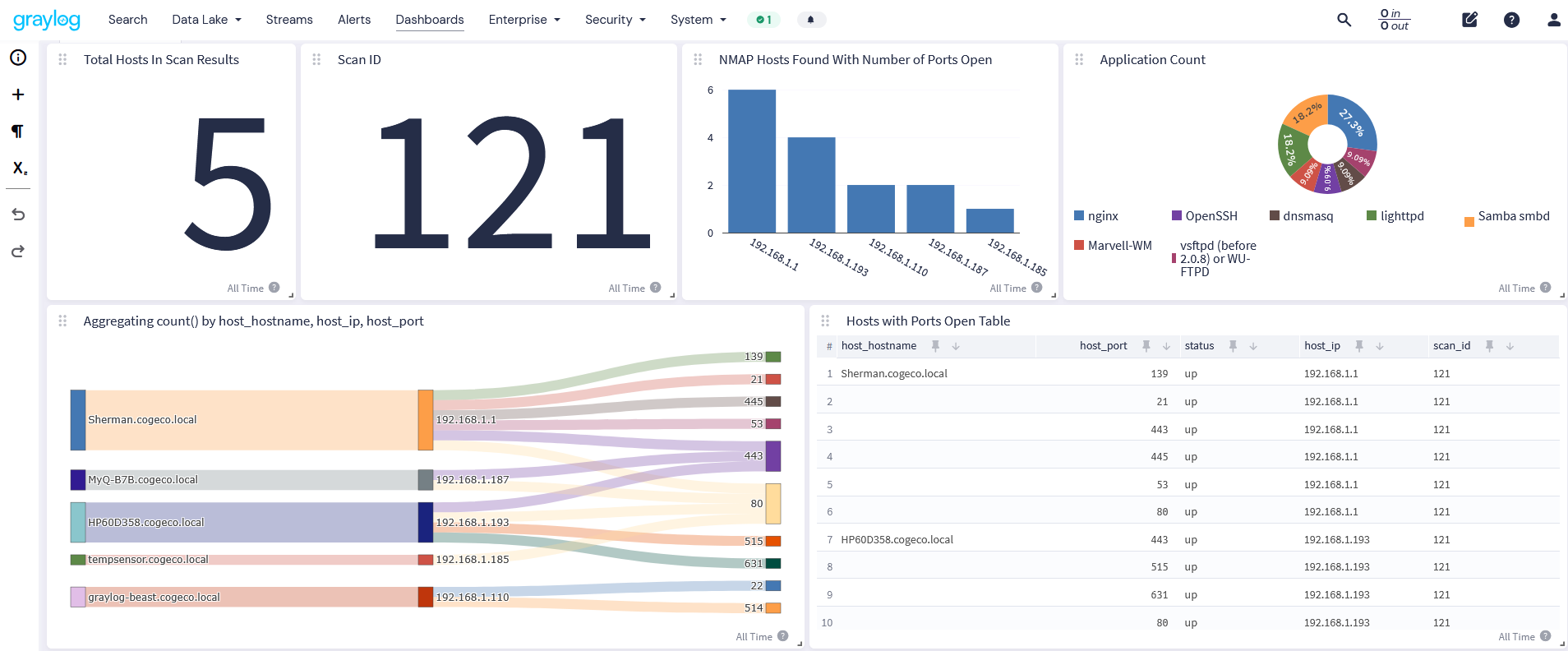
A Sankey diagram, also called a Sankey chart, is a flow diagram where each connection’s width is proportional to the quantity it represents. A wider band represents a bigger flow, making it easier to identify where volume concentrates or becomes sparse.
The name Sankey comes from Irish Captain Matthew Henry Phineas Riall Sankey who popularized the diagram style in 1898 as a way to demonstrate the steam engine’s energy efficiency. However, it was originally used and created by Charles Minard to represent Napoleon’s invasion of Russia in 1812 depicting the chart in 1869. The format later became standard for representing heat balance, energy flows, and material flows, and has been used in life-cycle assessment and material flow management since the 1990s.
How Do Sankey Diagrams Work?
Sankey charts have two elements:
- Nodes: the fixed points each identified with a node label, like source category such as IP or user name and a destination category such as a log source, host, or process stage.
- Links: Connector lines between the nodes where width scales based on the volume through the connection.
Often, Sankey diagrams use color to differentiate between categories of traffic or a single flow across multiple stages. Most interactive versions add hover text that shows a link’s exact value.
Security analysts read these charts from left to right so that they can identify where volume originates, splits, and ends. While a table can tell an analyst what happened, a Sankey diagram shows them how much across multiple paths.
Why Do Security Teams Use Sankey Diagrams?
While Sankey charts provide insight into flow data, other visualizations help security teams track different types of information about how network traffic, users, data, and devices move throughout an environment.
Network Traffic Between Hosts
Sankey charts can visualize which source IPs send the most traffic to which destinations. This enables security teams to identify an abnormally thick link that could get buried in a firewall log table.
Authentication and Login Paths
Security teams use Sankey charts to track successful and failed logins by user, host, or region. This enables them to identify a sudden shift in flow width toward failed which is easier to see in a visualization than a count table.
Attack Paths and Kill Chains
Using Sankey diagrams, security teams can map how an attacker moves throughout an environment, starting with initial access through lateral movement and ending with data exfiltration. The link width shows the paths with the most activity.
Log Source Routing
When managing log data, security teams can use Sankey charts for insight into how volume moves from raw log sources through processing pipelines into their indices. This visibility can help them spot a misconfigured or overloaded pipeline before it causes data loss.
What Other Types of Visualizations Do Security Teams Use?
While Sankey charts provide insight into flow data, other visualizations help security teams gain other insights quickly.
Node-Link Graphs
Instead of showing volume between two points, a node-link graph shows the relationships, like how endpoint assets, or alerts connect to each other. The visualizations help security teams identify patterns, clusters, and outliers that a table or Sankey diagram fails to surface. They work well for alert triage, network analysis, and incident response.
Heatmaps
These visualizations help security analysts compare two categories of fields, like source IP to destination port or user to host. The heatmap uses color to show intensity around where the activity concentrates, making it a good substitute when a Sankey diagram would have too many nodes to remain readable.
Bar Charts
Bar charts work well for head-to-head category comparisons, like top talkers by host or alert counts by severity. Security teams use these charts when they want exact, at-a-glance visibility into comparisons rather than a sense of flow.
Line Charts
Security teams use line graphs to track metrics over time, like event volume, failed logins, or bandwidth usage. By reviewing the line’s ups and downs across the horizon, security analysts can view spikes or trends that a static flow diagram fails to surface.
Why Do Security Teams Struggle to Build Sankey Diagrams?
When building Sankey diagrams, data must be in a specific shape with a source, a target, and a weight for every connection. Often, security log data is scattered across various tools and provided in different formats.
Using a Spreadsheet: Excel, Add-ins, and Google Sheets
While using a spreadsheet seems like a good idea, each variation on the theme creates a similar challenge:
- Excel: Lacks a built-in Sankey chart type so manual processes for stacked bar charts or XY scatter graphs that look similar must be rebuilt when changes to underlying data exist.
- Free Excel add-ins: Few exist with primary use cases being one-time financial or process mapping and process diagrams not continuously refreshed security data.
- Google Sheets: Lacks built-in option with even more limited manual workarounds than Excel.
Using Code
Many security analysts try to use libraries to render a proper Sankey diagram, like working with Plotly and Google Charts. While these provide more control over nodes, links, and color mapping, they also require exporting data, writing custom code, and losing real-time refreshing capabilities. Unfortunately, security teams need real-time visibility and these coded diagrams are as current as the last data export.
Best Practices for Building Usable Sankey Diagrams
Security teams can use Sankey charts for at-a-glance, real-time visibility into their systems. By following some best practices, they can create useful diagrams.
Cap the Node Count
Too many nodes turns a Sankey diagram into a tangle of crossing links instead of a readable chart, so you should consider scoping each view to a manageable number of nodes rather than trying to show everything at once.
When looking for a solution that enables your team, you should consider whether it offers:
- Real-time search and aggregation, so you can adjust groupings on the fly instead of rebuilding a chart from scratch
- Flexible field-level aggregation, so narrowing down to a manageable node count doesn’t mean losing the underlying data
- Saved views, so a well-scoped chart doesn’t have to be reconfigured every time you need it
Group by the Fields That Answer the Question
The right pairing should map directly to your investigation, like source IP to destination port, user to host, log source to index.
When looking for a solution that enables your team, you should consider whether it offers:
- Processing pipelines that normalize and enrich fields, so the same field means the same thing across every log source
- Search across any field without pre-defined schemas, so you’re never limited to a fixed set of groupings
- Streams that pre-filter relevant data, so your groupings stay focused on the traffic that actually matters
Pair It With a Drill-Down View
A Sankey diagram excels at showing security analysts where to look. However, the location is only one last step in an investigation. Security teams need to link an event’s location to a table or raw event view so an analyst can go from “this flow looks off” to the actual events behind it in one click.
When looking for a solution that enables your team, you should consider whether it offers:
- One-click drill-down from a visualization into the underlying raw events
- Alerting built on the same data, so a flow that looks off can trigger a notification, not just a visual cue
- A unified data model across ingestion, so every visualization in your SIEM is reading from the same source of truth
Graylog: Out of the Box Security Visualizations for Improved Dashboards
Graylog enables security teams to build dashboards from a full library of visualization types, with no custom code or manual data exports required. With Graylog’s visualizations, security teams never need to worry about having a dedicated analyst to build custom charts by hand. Teams can easily stand up a new visualization in just a few clicks, making it easier to catch an anomaly rather than missing it in a wall of raw event data.