

Host-based intrusion detection often lives at the edge of a SOC’s attention, generating a steady stream of file integrity alerts, authentication events, and active response actions that rarely get the same scrutiny as firewall or EDR data. OSSEC HIDS has been quietly filling that role on Unix, Linux, and Windows systems for years, watching log files, checking file and registry integrity, and triggering active responses when something looks wrong.
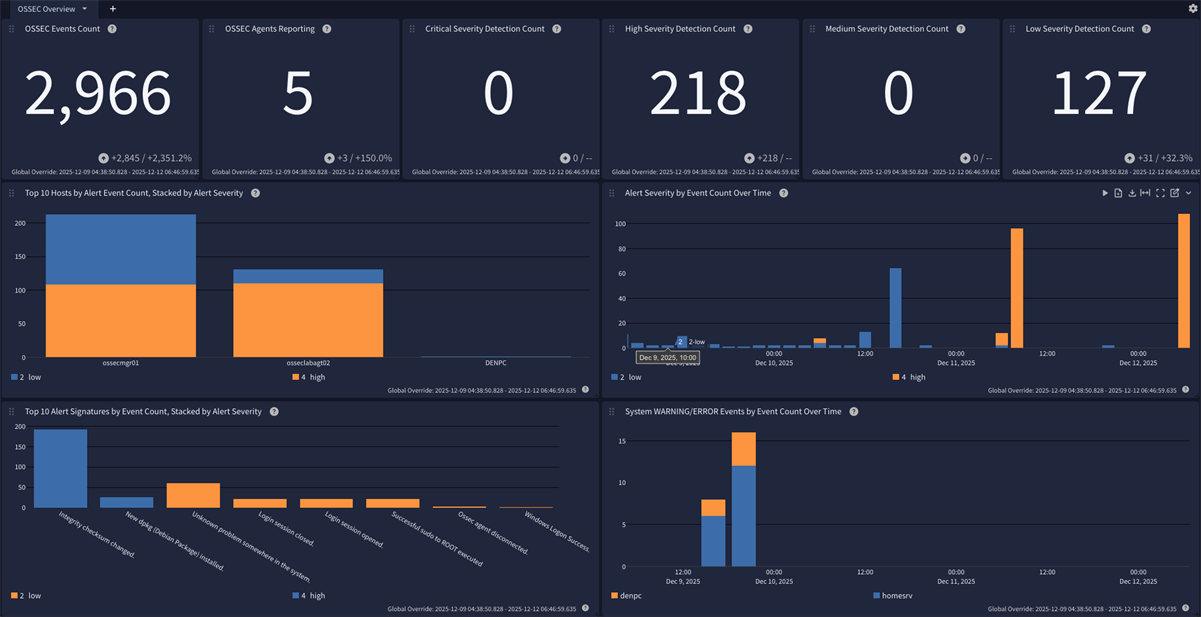
The OSSEC HIDS Content Pack for Graylog parses that data into Graylog schema-compatible fields, maps it to the Graylog Information Model (GIM), and ships with an Illuminate spotlight dashboard so your team gets structured visibility instead of a wall of raw alert text. This pack is available with a Graylog Illuminate license and Graylog Enterprise or Graylog Security.
What Is OSSEC?
OSSEC is a free and open source host-based intrusion detection system (HIDS) that performs log analysis, file integrity checking, rootkit detection, and active response across Unix, Linux, and Windows systems. A central OSSEC manager collects data from agents installed on monitored hosts and evaluates it against a ruleset to generate alerts.
Because OSSEC sits directly on the host, it captures activity that network-based tools never see:
- Was a log entry on the host itself flagged as suspicious?
- Did a file or registry key change unexpectedly?
- Was an authentication attempt on the host successful or a failure?
- Did OSSEC take an active response action, such as blocking an IP?
That combination of log-based detection, integrity monitoring, and automated response makes OSSEC a useful source of host-centric security telemetry, not just a system administration tool.
What This Pack Does
The content pack takes the four log files an OSSEC deployment produces and turns them into normalized, searchable, correlatable fields. It includes:
| Included In This Pack | Details |
| Parsing rules | Extract OSSEC log messages into Graylog schema-compatible fields |
| GIM categorization | Event type codes, categories, subcategories, and event types for authentication, IAM, network, audit, and detection alerts |
| Illuminate spotlight dashboard | One tab: Overview |
| Stream | “Illuminate:OSSEC Log Messages”, created and configured automatically if it does not already exist |
| Index set | “OSSEC Log Messages”, created with daily rotation and 90 days retention if it does not already exist |
| Requirements | |
| Graylog Server | Version 7.0.0 or later with a valid Enterprise license |
| OSSEC manager | Configured to generate alerts.json |
| Log delivery | Graylog Sidecar or a stand-alone Filebeat agent installed on OSSEC system(s) |
| Supported versions | OSSEC 3.7.0 and later |
Getting OSSEC Logs Into Graylog
OSSEC logs reach Graylog through the Elastic Filebeat agent, most easily configured using the Graylog Sidecar. Collection should be configured from the manager and from all agents.
Step 1: Configure OSSEC to Generate JSON Alerts
On the OSSEC manager, edit ossec.conf and add jsonout_output inside the <global> section:
<global>
<email_notification>no</email_notification>
<jsonout_output>yes</jsonout_output>
</global>
OSSEC does not rotate the alerts JSON file on its own, so plan a logrotate strategy for it.
Step 2: Configure Sidecar
Set up Graylog Sidecar for Filebeat following the official documentation, then create a matching Beats input in Graylog. Ensure the option “Do not add Beats type as prefix” is disabled.
Linux systems:
- type: filestream
id: ossec-filestream
enabled: true
paths:
- /var/ossec/logs/alerts/alerts.json
- /var/ossec/logs/active-responses.log
- /var/ossec/logs/firewall/firewall.log
- /var/ossec/logs/ossec.log
fields_under_root: true
fields:
event_source_product: ossec
Windows systems:
filebeat.inputs:
- type: filestream
id: ossec-agent-filestream
enabled: true
paths:
- 'C:\Program Files (x86)\ossec-agent\ossec.log'
- 'C:\Program Files\ossec-agent\logs\ossec.log'
parsers:
- multiline:
pattern: '^\d{4}/\d{2}/\d{2}'
negate: true
match: after
fields_under_root: true
fields:
event_source_product: ossec
These snippets add OSSEC ingestion to an existing Filebeat configuration using the default OSSEC paths; they are not complete, stand-alone configurations. Illuminate also does not support the OSSEC Syslog output, since OSSEC sends syslog messages over UDP, which can truncate larger log messages.
Events Processed
The pack recognizes and parses all four log files an OSSEC deployment generates:
- json – JSON-formatted alert records from the OSSEC analysis engine, representing rule and decoder detections. Generated on the manager only.
- log – Plain text service log covering component startup, shutdown, internal state changes, errors, and warnings. Present on the manager and all agents.
- active-responses.log – Plain text record of active response actions, such as command invocation, target address, and result. Present on any system with active responses enabled.
- log – Plain text record of firewall-related active response activity, such as IP blocking performed via firewall-drop.sh. Present on systems where firewall-based active responses execute.
Each of these is parsed into individual fields, such as source_ip, alert_signature_id, vendor_action, and destination_reference, rather than left as unstructured text.
GIM Categorization
Categorization is assigned according to the OSSEC alert signature ID, stored in rule.sidid on the source message and normalized to alert_signature_id, based on the default OSSEC ruleset.
| SIDID / Property | Event Description | Category | Subcategory | Event Type |
| authentication_failed / success, invalid_login | Authentication events | authentication | authentication.logon | logon |
| adduser group | New user account created | iam | iam.object create | account created |
| account_changed group | Existing account modified | iam | iam.object modify | account modified |
| Firewall log events | Firewall allow/deny events | network | network.connection | network connection |
| 593, 18118 | Windows audit log cleared | audit | audit.integrity | audit log cleared |
| policy_violation group | Policy violation alerts | audit | audit.policy | audit policy changed |
| 594–598, registry syscheck | Windows registry integrity events | registry | registry.default | registry event |
| Ossec agent * signature | Agent lifecycle events | agent | agent.default | agent default |
| web, attacks, ids, recon groups | Web attack and recon detection | detection | detection.network_detection | network detection |
| rootcheck / rootkit groups | Rootkit and host anomaly detection | detection | detection.host_detection | host malware detection |
| 550–555, file syscheck events | File integrity finding | detection | detection.host_detection | fim detection |
| All other OSSEC SIDs | Implicit mapping for remaining alerts | detection | detection.host_detection | hips detection |
Why Log OSSEC Events?
Host-based detection data is easy to leave siloed on the box that generated it. Centralizing OSSEC logs in Graylog puts file integrity, authentication, and active response activity alongside every other GIM-mapped source in your environment.
Security Monitoring
The pack’s Security Core coverage maps authentication events with event_outcome distinguishing success from failure, giving analysts a fast way to spot brute-force attempts and credential abuse across every monitored host, not just the ones someone happens to be watching that day.
Threat Hunting
Fields like vendor_source_ip and vendor_source_port, extracted from SSH authentication log lines in vendor_full_log, let hunters pivot from a single suspicious login attempt to every other host that saw traffic from the same source. Rootcheck and rootkit alerts, mapped to host_detection, surface anomalies worth chasing before they escalate.
Incident Response
The active-responses.log and firewall.log data record what OSSEC attempted to do in response to an alert, such as invoking host-deny.sh to block an IP. The log reflects the action OSSEC took, not necessarily what the underlying system ultimately enforced. Centralizing that data in Graylog gives responders a searchable record of those response attempts to review alongside the alert activity from the same time window, rather than reconstructing the sequence by hand from raw text logs on the host.
Compliance
The pack’s default 90-day retention, combined with structured file integrity monitoring (FIM) and audit policy change detection, supports audit requirements under frameworks like SOC 2, PCI DSS, and CIS Controls that call for demonstrable oversight of host integrity and account changes.
Ready to get started? Graylog Security and Graylog Enterprise with Illuminate give you this content pack plus coverage for dozens of other critical log sources out of the box, with no manual parsing required.